
Set up Brand Points in myne
Hold a points balance in myne, name your points, and set how customers earn.
Published
 Lakshey
Points turn individual purchases into progress towards a reward. Each time a customer spends with your business, they build a balance that gives them something to look forward to on a future visit. Over time, that progress can help make your business the place they choose more often.
With Brand Points, you decide how customers earn points and what they can redeem them for, whether that’s a favourite item or a discount on their next purchase. Customers see their balance on their Apple or Google Wallet pass, keeping their next reward within reach.
Your earning rate and rewards work together: the rate determines how quickly customers collect points, while the rewards give those points value. A clear program with appealing, achievable rewards helps customers understand why it pays to keep coming back.
Turn on Brand Points
Go to Settings → Integrations → Brand Points.
Turn on Enable Brand Points.
Under Points configuration, set:
Points label — the name shown to customers and staff, including on wallet passes (for example Stars or Points).
Earn rate — how many points customers earn for each dollar spent.
Historical period to reward (days) — when a customer links their card, how far back to award points on past purchases.
Welcome points — points offered when a customer connects.
Select Save.
Status shows as Active when Brand Points is on. Customers with a phone or email are pre-registered for loyalty.
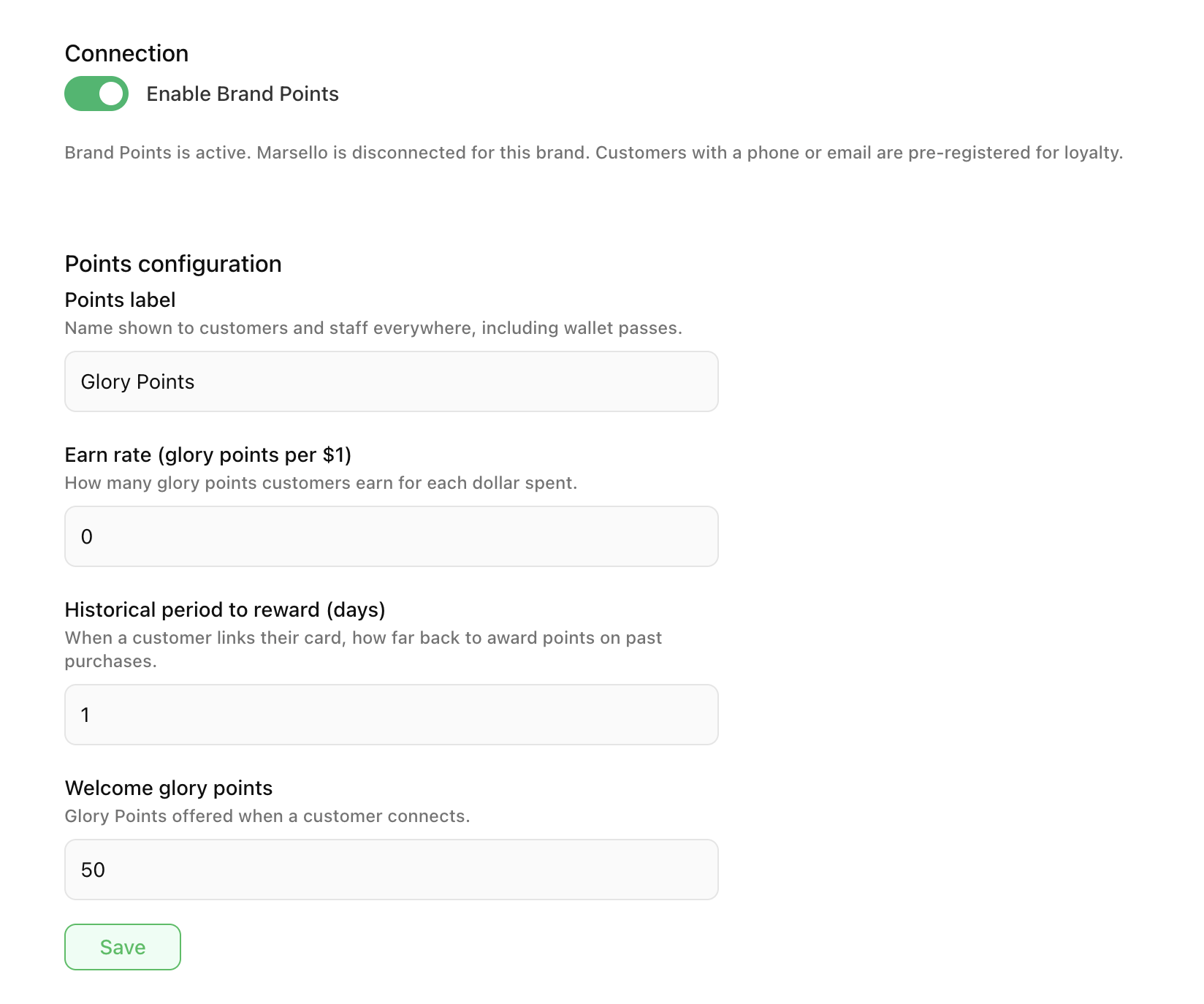
How customers earn and use points
Eligible purchases on connected sales channels award points at your earn rate. Customers see the balance under your points label on their wallet pass.
Redeem behaviour depends on how you run promotions and which POS or ordering apps are connected. Use the History tab on the Brand Points page to review points activity.
Square Loyalty and other points providers
If Enable Square Loyalty is on, Brand Points stays on but is locked. Earn rate and points label are managed in the Square Loyalty dashboard, not in the Brand Points fields. See Connect Square Loyalty to myne.
If you use Marsello as your points provider instead, connect Marsello and leave Brand Points off. Enabling Brand Points disconnects Marsello for that brand.
Optional earn rules
When Brand Points is managed in myne (not locked by Square Loyalty), you can add ordering rules on the same page to vary earn rates by channel, products, categories, or Customer Groups. Start with the standard earn rate, then add rules only if you need different behaviour for specific orders.
Organisations
At head office, Shared Org must be on before you enable Brand Points for the organisation. Enabling at head office applies Brand Points across the organisation and overrides brand-level configuration. Brands that are managed from head office see a notice to configure Brand Points there.
Related: Using Digital Passes to Recognise Customers · Marsello - How to Connect · Connect Square Loyalty to myne