
Choose who can see and use a promotions
Control promotion visibility and eligibility for different customer types
Published
 Lakshey
Promotions can be shown to different types of customers depending on what you are trying to achieve. You might make an offer visible to everyone to encourage new customers to connect, keep an offer just for known customers, or make it available only to a particular Customer Group such as regulars or customers who have not visited recently.
You can also choose where the promotion appears, such as on a myne Connection Page or through a connected ordering platform.
These options are managed under Who can see and where when you create or edit a promotion. For help creating the promotion itself, see Setting up Promotions.
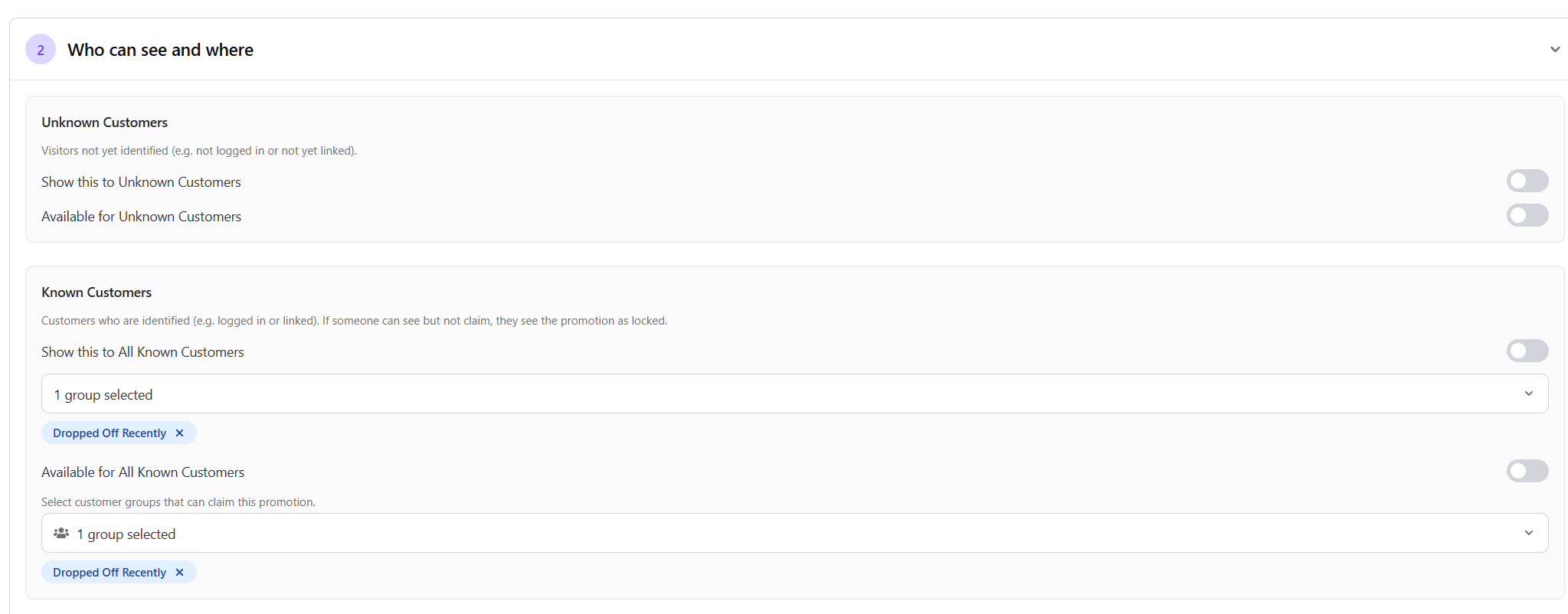
Choose who can see and use the promotion
myne separates Show from Available:
Show controls who can see the promotion.
Available controls who is eligible to use it.
This means you can show someone an offer before they are eligible to claim it. For example, an unknown customer could see a promotion that becomes available once they identify themselves.
For customers who have not yet been identified, use:
Show this to Unknown Customers
Available for Unknown Customers
For customers myne can identify, use:
Show this to All Known Customers to make the promotion visible to every known customer, or turn it off and select specific Customer Groups.
Available for All Known Customers to let every known customer use it, or limit availability to selected Customer Groups.
This lets you make a promotion broadly visible while still controlling who can actually redeem it.
Choose where the promotion appears
Under Where this promotion appears, choose the places where customers can see the offer.
Connection pages is always available. Turn it on to show the promotion through your myne Connection Pages and direct promotion links.
Other connected POS or ordering platforms may also appear here when they are available for your brand. Turn on the places where you want the promotion to be shown.
These settings control where the customer sees the promotion. How the promotion is redeemed depends on the promotion and the connected platform.
For promotions used at Shopify checkout, see Shopify coupons and promotions.