
Journey reports
Monitor workflow performance and identify bottlenecks
Published
 Lakshey
Journey Reports help you understand how records move through your workflow. Instead of just showing where businesses or contacts are today, reports provide insights into how your Journey is performing over time.
Use reports to identify bottlenecks, monitor team performance, and understand how efficiently records progress from one stage to the next.
Viewing reports
Open a Journey and select the Report tab.
The report is generated using the current and historical activity within your Journey, giving you a snapshot of how records have progressed through each stage.

Stage performance
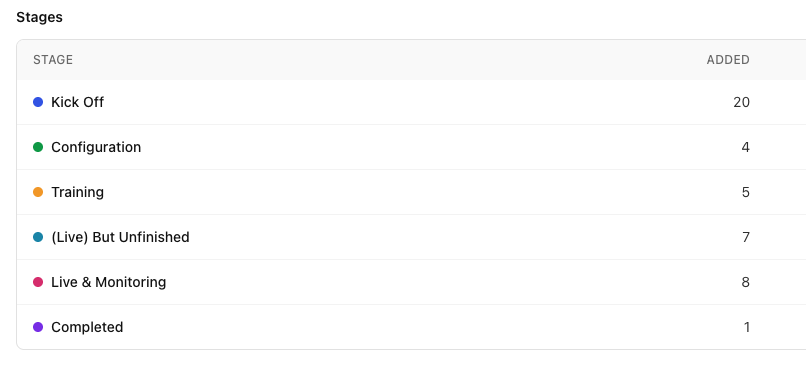
The Stages report provides an overview of every stage in your Journey.
For each stage you'll see:
In Stage Now – The number of records currently in that stage.
Run Property totals – Totals for linked properties such as Deal Value.
Median Time in Stage – The typical amount of time records spend before moving on.
Reached (First Time) – How many records have entered that stage.
These metrics make it easy to identify where work is progressing smoothly and where records may be getting delayed.
Performance by property
Journey Reports also group records using your linked Run Properties.
Depending on your Journey, this might include information such as:
Owner
Referral source
Region
Team
Implementation manager
Any custom property you've added
This allows you to compare workload, monitor performance across different teams, and understand how records are distributed throughout your business.
Using reports to improve your workflow
Reports can help answer questions such as:
Which stage is slowing down our process?
How long does onboarding typically take?
Which team member has the most active records?
Which referral source generates the most opportunities?
How much potential value is currently sitting in our pipeline?
By regularly reviewing these metrics, you can identify opportunities to improve your workflow and remove bottlenecks before they impact your customers or team.
Reporting works with any Journey
Because Journeys are fully customisable, reports adapt to the workflow you've created.
A sales pipeline might report on deal value and referral sources, while an onboarding Journey could report on implementation owners, training dates, or customer types.
Whatever process you're managing, Journey Reports provide a clear picture of how records move through your workflow and where improvements can be made.
What's next?
Now that you're familiar with Journeys, explore Automations to automatically enrol records, move them between stages, and reduce manual work throughout your workflow.